Reuse datasets across projects
Note
The dataset reusability feature may not be enabled on your deployment. To find out more, contact support@robovision.ai.
In many cases, the same dataset needs to be used across multiple projects—for example, during model development workflows such as training, testing, or optimization. To support this, Robovision AI allows you to reuse datasets across projects that share the same annotation type, helping you avoid duplicating data and ensuring consistency.
You can reuse datasets in the following scenarios:
- Setting up trainings.
- Setting up tests.
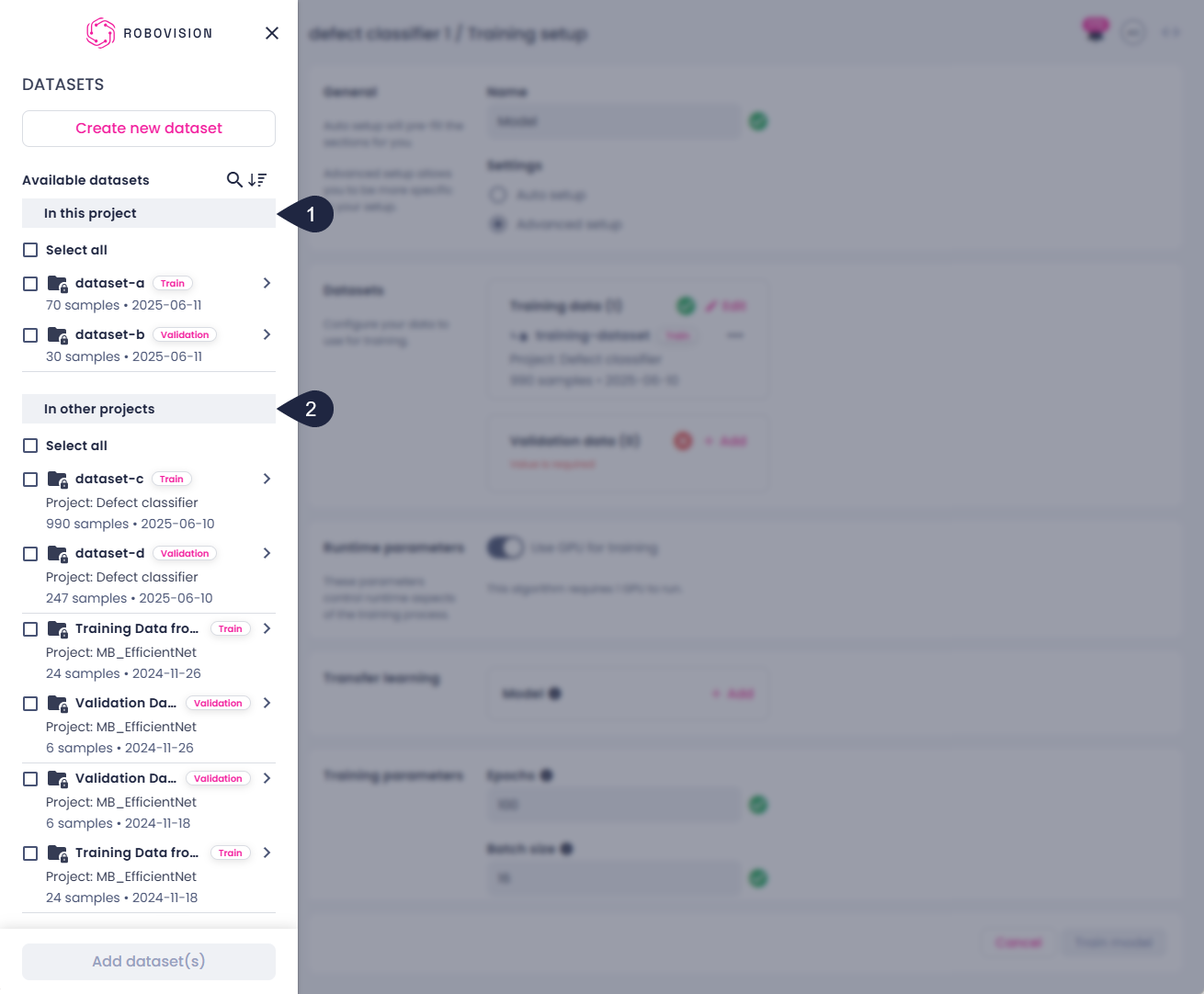
During test setup, you can select datasets from other projects to use as test data. Similarly, during training setup, you can choose datasets from other projects for training data. The dataset list displays datasets from the current project first (1), followed by datasets from other projects(2).
Reused datasets are referenced, not duplicated. This means:
- All projects with reused datasets use the exact same dataset source.
- Deleting or renaming the dataset in the source project will remove or rename it from all projects where it has been reused.
- Reused datasets will not appear in the dataset list of the projects where they are reused.
Limitations
- You cannot apply tags to datasets that are reused from other projects when working within the test center. Tagging is only supported for datasets that originate within the current project.
Key takeaways
- Datasets can be shared during training and test setup.
- Only projects that have the same annotation type can share datasets.
- Reused datasets are referenced, not duplicated.