Group data with tags
Glossary
Tags are useful if you need to assign custom characteristics to samples. Tags act like filters—you select a tag, and then it filters the samples by that tag. You can combine selecting filters and tags.
Tags can be created and applied in the data center, label center, and test center. Tags are shared across all centers—a tag created in one center is available in the others. In the test center, you can group data that is labeled incorrectly or needs reviewing, filter it in the label center, and have it relabeled or reviewed.
Here is an example of how to use tags to group data in the test center for relabeling in the label center:
flowchart LR
    step1["<b>Test center</b>
    Tag data that needs
    relabeling or reviewing"]
    step2["<b>Label center</b>
    Filter data using
    Tags filter"]
    step3["<b>Label center</b>
    Relabel filtered
    data"]
    step4["<b>Label center</b>
    Create datasets
    with relabeled data"]
    step1 -.-> step2 -.-> step3 -.-> step4

    style step1 fill:#fff,stroke:#F2209E,stroke-width:1px
    style step2 fill:#fff,stroke:#F2209E,stroke-width:1px
    style step3 fill:#fff,stroke:#F2209E,stroke-width:1px
    style step4 fill:#fff,stroke:#F2209E,stroke-width:1px
Note
The number of tagged samples may differ between the test center and the label center. This occurs because some samples may be deleted in the label center while still remaining as test results in the test center.
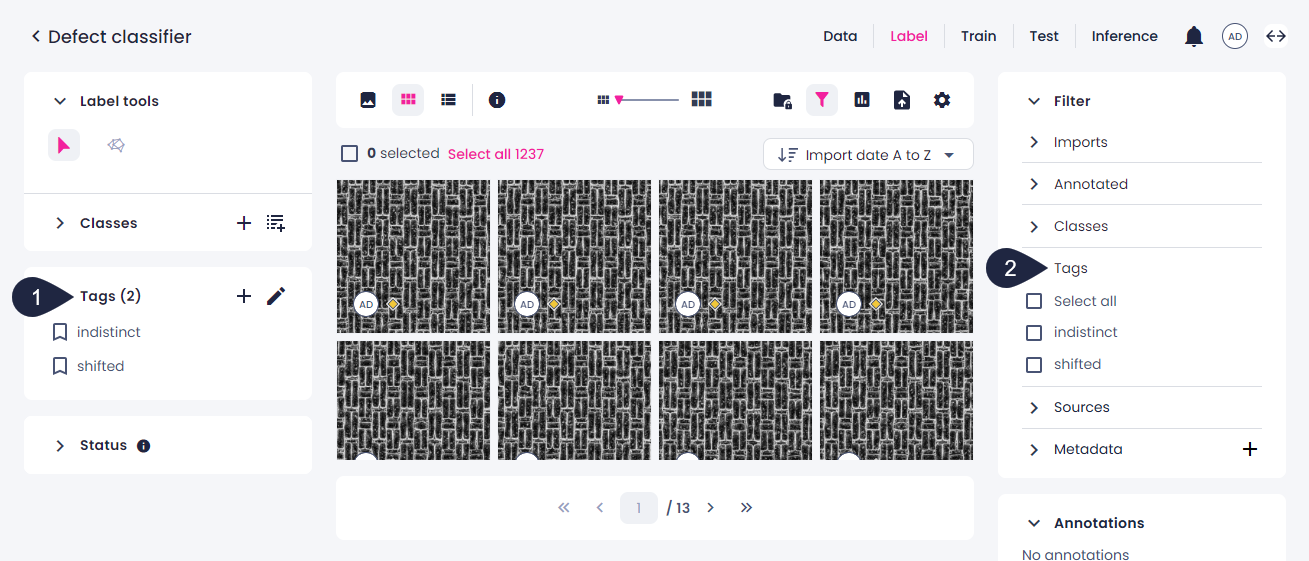
In the label center and test center, you can use the Tags panel on the left to create, edit, apply, or delete tags (1). In the data center, you can manage tags on the Tags tab or by selecting samples and clicking Tag. In all centers, you can filter samples using tags in the Filter panel (2). For more information, see Filter samples.
Key takeaways
- Tags can be used to organise your samples.
- Use filters to select samples with specific tags.
- Unlike annotations, tags have no effect on training.
- You can apply tags in the label center and the test center, but not on the Datasets page.
- Unlike annotations, tags on samples in datasets are not protected or frozen.
- Tags applied in the test center will also appear in the label center, and vice versa.
- It's possible to delete samples from the label center by deleting imports. However, these samples with their tags will not be deleted on the Datasets page or in the test center (if you use datasets for your test data).