Robovision AI 5.6 release notes
Release date: July 2, 2024
What's new
Semantic segmentation (PIDNet)
- You can now create semantic segmentation projects on Robovision AI. For more details, see Project types.
Branding and brand assets
-
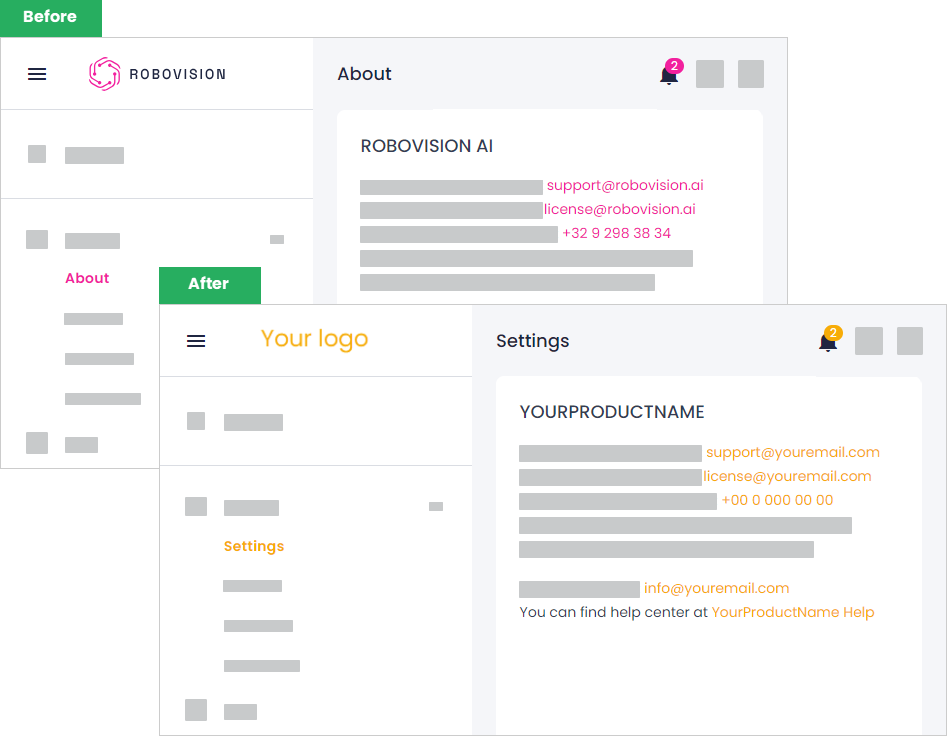
You can now customize the Robovision AI platform to match your brand's look and feel. For more information, see Branding and Change brand assets.
-
You can also easily transfer your branding customizations to another instance of Robovision AI. For this, you need to export brand assets from the source platform and import these brand assets into the target platform.
System classes
-
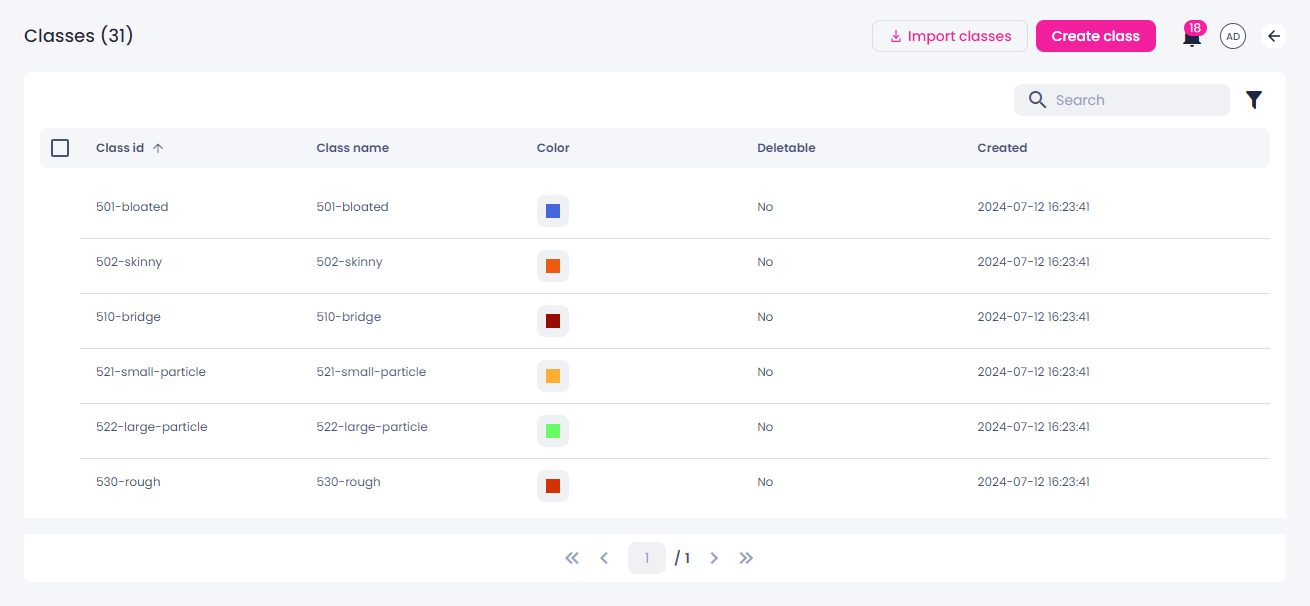
The list of classes used across all your Robovision AI projects is now available on the Classes page of the System module. Here, you can:
- Import classes in the KRF and CSV formats.
- Create new classes that can be later reused in any project.
- Delete the classes that you no longer need.
-
When you add classes in your project, you can either create a new class or reuse the one that already exists in the system. For the detailed steps, see Add classes to label samples.
Label center
- You can transfer data between Robovision AI platforms by exporting and importing samples. In the target platform, the member who performed the import becomes the author of annotations.
- When you remove a tag from the selected samples, you now need to confirm that you want to do it.
Datasets page
-
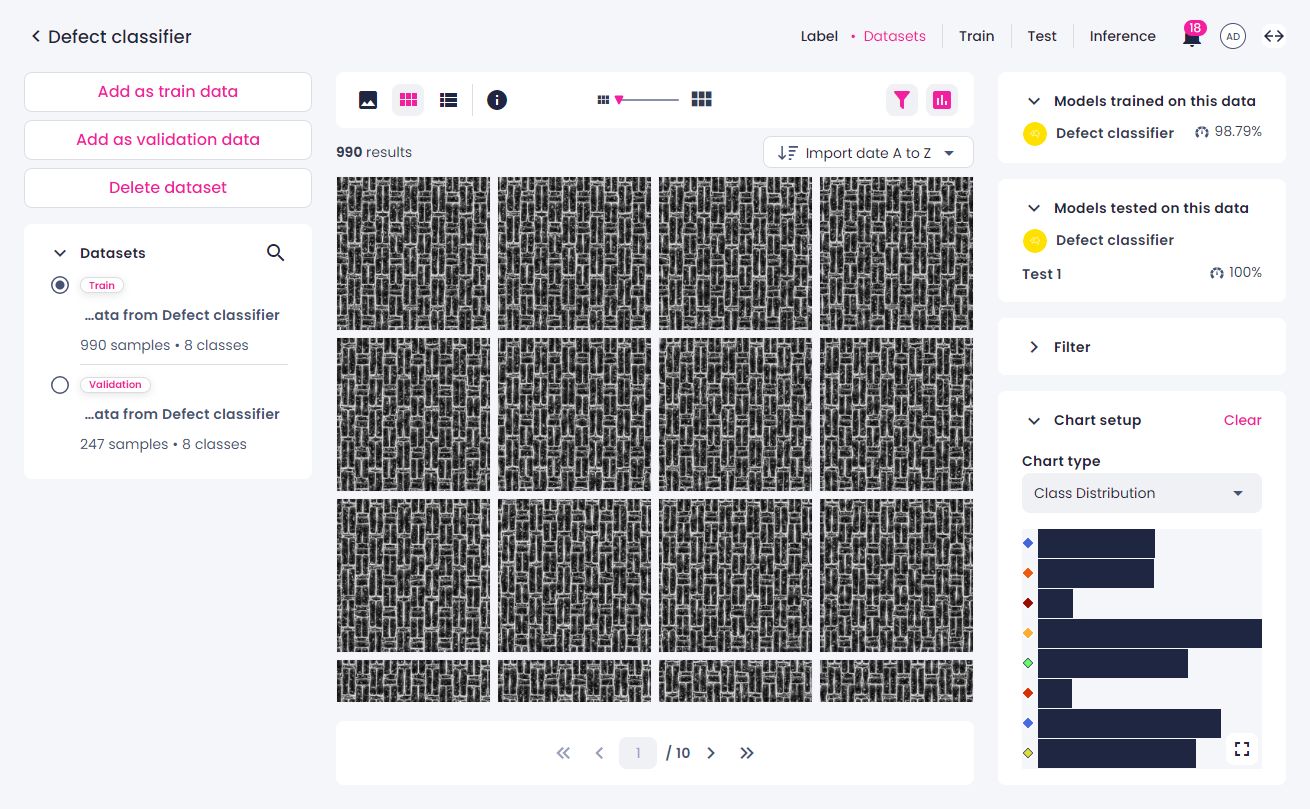
The Datasets page has been redesigned. Here, you can:
- View the number of samples and classes in each dataset and switch between datasets.
- Use the selected dataset for training as train or validation data.
- Delete a dataset.
- View the list of models trained on a dataset and the list of models tested on a dataset.
- View class distribution for a dataset.
Training center
- EfficientNet, PIDNet: You can now use augmentation techniques during training.
- If you can't start a training because the storage is full, you will now receive a notification in the notification center.
Inference
- Now, you can create multiple inferences in one project. If needed, you can also run multiple inferences at the same time, provided that Robovision AI has enough resources (GPU, CPU, and memory).
- When you set up an inference, you can now choose if you want to just save the setup or save the setup and run the inference. For the detailed steps, see Set up inference.
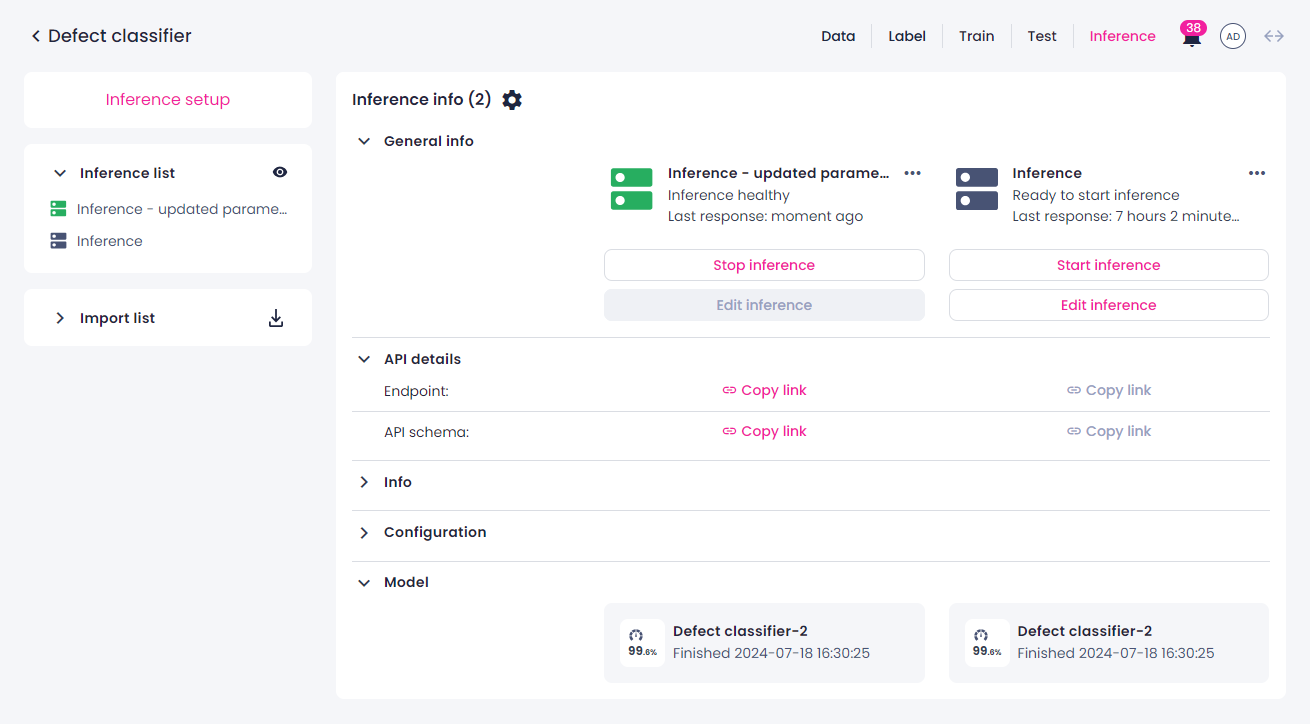
- The Inference section of the project details page has been renamed to Inference center. This section features the list of inferences and their statuses. Here, you can set up a new inference, start or stop an inference, view inference details, and rename, edit, or delete an inference.
-
You can now compare the inference information and parameters on the inference details page. Here, you can also initiate a new inference, manage the existing inference, and view the API details. For more information, see Inference.
-
If needed, you can transfer an inference setup between Robovision AI platforms by exporting and importing it.
Project metadata
- It is now possible to add project metadata to algorithms.
Other improvements
-
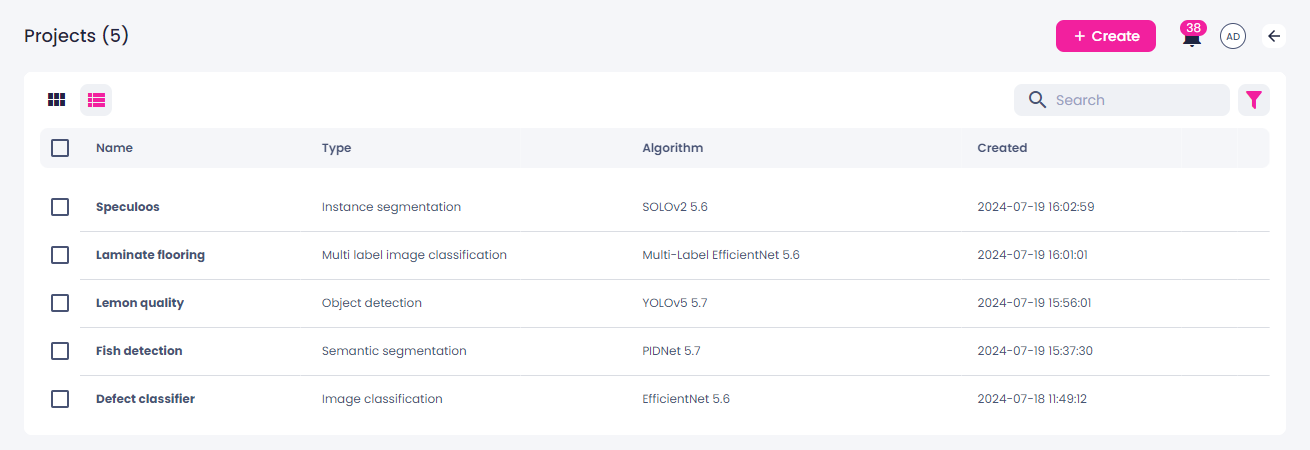
On the Projects page, you can now view both the type and the algorithm of a project.
API changes
Potential breaking changes in the API
-
The following API endpoints, which were used in non-supported functionality, have been removed.
file rvai_hub.openapi.yml schema Algorithm: Missing property: gitOrigin file rvai_hub.openapi.yml schema Algorithm: less required in output: prebuilt file rvai_hub.openapi.yml schema RuntimeParameters: Missing property: maxInactivityPeriod file rvai_hub.openapi.yml path /algorithms: Missing verb: post file rvai_hub.openapi.yml: Missing paths: /algorithms/git file rvai_hub.openapi.yml: Missing paths: /algorithms/{id}/{version}/logs file rvai_hub.openapi.yml: Missing paths: /algorithms/{id}/{version}/source file rvai_hub.openapi.yml: Missing paths: /algorithms/{id}/{version}/webhook file rvai_hub.openapi.yml: Missing paths: /algorithms/{id}/{version}/webhook/secret -
The following method is deprecated and will be removed in Robovision AI 5.8. Use POST instead.
-
One of the values of the
WorkflowStatusenum has been removed. -
The following redirects are now served directly. Normally, API clients handled these redirects in the background, so there should be no impact on the client code.
file rvai_hub.openapi.yml path /algorithms/types/{algorithm_type}/thumbnail verb get: Missing responses: 307 file rvai_hub.openapi.yml path /algorithms/{id}/{version}/thumbnail verb get: Missing responses: 307 file rvai_hub.openapi.yml path /deployments/{deployment_id}/logs verb get: Missing responses: 307 file rvai_hub.openapi.yml path /jobs/{job_id}/logs verb get: Missing responses: 307 file rvai_hub.openapi.yml path /resources/blobs/{resource_id}/data verb get: Missing responses: 307 file rvai_hub.openapi.yml path /resources/models/{resource_id}/data verb get: Missing responses: 307 file rvai_hub.openapi.yml path /resources/parameters/{resource_id}/data verb get: Missing responses: 307 -
Some fields used as an output are now nullable because previously this information was not passed along correctly. Below, see the list of the affected schemas and the property.
Cardinality.max
Cardinality.min
ClassDefinition.color
ClassDefinition.name
ExampleDefinition.description
ExampleSchemaDefinition.logicalType
MinMaxDefinition.max
MinMaxDefinition.min
NodeDefinitionAnchoredVector3D.description
NodeDefinitionArrayND.description
NodeDefinitionBlob.description
NodeDefinitionBoolean.description
NodeDefinitionBox2D.description
NodeDefinitionBox3D.description
NodeDefinitionBytes.description
NodeDefinitionCameraParameters.description
NodeDefinitionDict.description
NodeDefinitionFloat.description
NodeDefinitionImage2D.description
NodeDefinitionInteger.description
NodeDefinitionLabel.description
NodeDefinitionList.description
NodeDefinitionMask2D.description
NodeDefinitionMask3D.description
NodeDefinitionObject.description
NodeDefinitionPlane.description
NodeDefinitionPoint2D.description
NodeDefinitionPoint3D.description
NodeDefinitionPointCloud3D.description
NodeDefinitionPointCloudMask.description
NodeDefinitionPolygon2D.description
NodeDefinitionPolygon3D.description
NodeDefinitionPolyline2D.description
NodeDefinitionPolyline3D.description
NodeDefinitionPose2D.description
NodeDefinitionPose3D.description
NodeDefinitionRigidTransformation3D.description
NodeDefinitionSemanticVersion.description
NodeDefinitionSet.description
NodeDefinitionSize2D.description
NodeDefinitionSize3D.description
NodeDefinitionSphere.description
NodeDefinitionText.description
NodeDefinitionTimestamp.description
NodeDefinitionTriangleMesh3D.description
NodeDefinitionTuple.description
NodeDefinitionURI.description
NodeDefinitionUnion.description
NodeDefinitionVector2D.description
NodeDefinitionVector3D.description
TextDefinition.default
TextDefinition.enum
TextDefinition.maxLength
TextDefinition.minLength
Cardinality.max
Cardinality.min
ClassDefinition.color
ClassDefinition.name
ExampleDefinition.description
ExampleSchemaDefinition.logicalType
MinMaxDefinition.max
MinMaxDefinition.min
NodeDefinitionAnchoredVector3D.description
NodeDefinitionArrayND.description
NodeDefinitionBlob.description
NodeDefinitionBoolean.description
NodeDefinitionBox2D.description
NodeDefinitionBox3D.description
NodeDefinitionBytes.description
NodeDefinitionCameraParameters.description
NodeDefinitionDict.description
NodeDefinitionFloat.description
NodeDefinitionImage2D.description
NodeDefinitionInteger.description
NodeDefinitionLabel.description
NodeDefinitionList.description
NodeDefinitionMask2D.description
NodeDefinitionMask3D.description
NodeDefinitionObject.description
NodeDefinitionPlane.description
NodeDefinitionPoint2D.description
NodeDefinitionPoint3D.description
NodeDefinitionPointCloud3D.description
NodeDefinitionPointCloudMask.description
NodeDefinitionPolygon2D.description
NodeDefinitionPolygon3D.description
NodeDefinitionPolyline2D.description
NodeDefinitionPolyline3D.description
NodeDefinitionPose2D.description
NodeDefinitionPose3D.description
NodeDefinitionRigidTransformation3D.description
NodeDefinitionSemanticVersion.description
NodeDefinitionSet.description
NodeDefinitionSize2D.description
NodeDefinitionSize3D.description
NodeDefinitionSphere.description
NodeDefinitionText.description
NodeDefinitionTimestamp.description
NodeDefinitionTriangleMesh3D.description
NodeDefinitionTuple.description
NodeDefinitionURI.description
NodeDefinitionUnion.description
NodeDefinitionVector2D.description
NodeDefinitionVector3D.description
ParameterDaemon.daemonSubpath
ParameterDefinitionAnchoredVector3D.description
ParameterDefinitionAnchoredVector3D.widget
ParameterDefinitionArrayND.description
ParameterDefinitionArrayND.widget
ParameterDefinitionBlob.description
ParameterDefinitionBlob.widget
ParameterDefinitionBoolean.description
ParameterDefinitionBoolean.widget
ParameterDefinitionBox2D.description
ParameterDefinitionBox2D.widget
ParameterDefinitionBox3D.description
ParameterDefinitionBox3D.widget
ParameterDefinitionBytes.description
ParameterDefinitionBytes.widget
ParameterDefinitionCameraParameters.description
ParameterDefinitionCameraParameters.widget
ParameterDefinitionDict.description
ParameterDefinitionDict.widget
ParameterDefinitionFieldAnchoredVector3D.description
ParameterDefinitionFieldAnchoredVector3D.groupId
ParameterDefinitionFieldAnchoredVector3D.widget
ParameterDefinitionFieldArrayND.description
ParameterDefinitionFieldArrayND.groupId
ParameterDefinitionFieldArrayND.widget
ParameterDefinitionFieldBlob.description
ParameterDefinitionFieldBlob.groupId
ParameterDefinitionFieldBlob.widget
ParameterDefinitionFieldBoolean.description
ParameterDefinitionFieldBoolean.groupId
ParameterDefinitionFieldBoolean.widget
ParameterDefinitionFieldBox2D.description
ParameterDefinitionFieldBox2D.groupId
ParameterDefinitionFieldBox2D.widget
ParameterDefinitionFieldBox3D.description
ParameterDefinitionFieldBox3D.groupId
ParameterDefinitionFieldBox3D.widget
ParameterDefinitionFieldBytes.description
ParameterDefinitionFieldBytes.groupId
ParameterDefinitionFieldBytes.widget
ParameterDefinitionFieldCameraParameters.description
ParameterDefinitionFieldCameraParameters.groupId
ParameterDefinitionFieldCameraParameters.widget
ParameterDefinitionFieldDict.description
ParameterDefinitionFieldDict.groupId
ParameterDefinitionFieldDict.widget
ParameterDefinitionFieldFloat.description
ParameterDefinitionFieldFloat.groupId
ParameterDefinitionFieldFloat.widget
ParameterDefinitionFieldImage2D.description
ParameterDefinitionFieldImage2D.groupId
ParameterDefinitionFieldImage2D.widget
ParameterDefinitionFieldInteger.description
ParameterDefinitionFieldInteger.groupId
ParameterDefinitionFieldInteger.widget
ParameterDefinitionFieldLabel.description
ParameterDefinitionFieldLabel.groupId
ParameterDefinitionFieldLabel.widget
ParameterDefinitionFieldList.description
ParameterDefinitionFieldList.groupId
ParameterDefinitionFieldList.widget
ParameterDefinitionFieldMask2D.description
ParameterDefinitionFieldMask2D.groupId
ParameterDefinitionFieldMask2D.widget
ParameterDefinitionFieldMask3D.description
ParameterDefinitionFieldMask3D.groupId
ParameterDefinitionFieldMask3D.widget
ParameterDefinitionFieldObject.description
ParameterDefinitionFieldObject.groupId
ParameterDefinitionFieldObject.widget
ParameterDefinitionFieldPlane.description
ParameterDefinitionFieldPlane.groupId
ParameterDefinitionFieldPlane.widget
ParameterDefinitionFieldPoint2D.description
ParameterDefinitionFieldPoint2D.groupId
ParameterDefinitionFieldPoint2D.widget
ParameterDefinitionFieldPoint3D.description
ParameterDefinitionFieldPoint3D.groupId
ParameterDefinitionFieldPoint3D.widget
ParameterDefinitionFieldPointCloud3D.description
ParameterDefinitionFieldPointCloud3D.groupId
ParameterDefinitionFieldPointCloud3D.widget
ParameterDefinitionFieldPointCloudMask.description
ParameterDefinitionFieldPointCloudMask.groupId
ParameterDefinitionFieldPointCloudMask.widget
ParameterDefinitionFieldPolygon2D.description
ParameterDefinitionFieldPolygon2D.groupId
ParameterDefinitionFieldPolygon2D.widget
ParameterDefinitionFieldPolygon3D.description
ParameterDefinitionFieldPolygon3D.groupId
ParameterDefinitionFieldPolygon3D.widget
ParameterDefinitionFieldPolyline2D.description
ParameterDefinitionFieldPolyline2D.groupId
ParameterDefinitionFieldPolyline2D.widget
ParameterDefinitionFieldPolyline3D.description
ParameterDefinitionFieldPolyline3D.groupId
ParameterDefinitionFieldPolyline3D.widget
ParameterDefinitionFieldPose2D.description
ParameterDefinitionFieldPose2D.groupId
ParameterDefinitionFieldPose2D.widget
ParameterDefinitionFieldPose3D.description
ParameterDefinitionFieldPose3D.groupId
ParameterDefinitionFieldPose3D.widget
ParameterDefinitionFieldRigidTransformation3D.description
ParameterDefinitionFieldRigidTransformation3D.groupId
ParameterDefinitionFieldRigidTransformation3D.widget
ParameterDefinitionFieldSemanticVersion.description
ParameterDefinitionFieldSemanticVersion.groupId
ParameterDefinitionFieldSemanticVersion.widget
ParameterDefinitionFieldSet.description
ParameterDefinitionFieldSet.groupId
ParameterDefinitionFieldSet.widget
ParameterDefinitionFieldSize2D.description
ParameterDefinitionFieldSize2D.groupId
ParameterDefinitionFieldSize2D.widget
ParameterDefinitionFieldSize3D.description
ParameterDefinitionFieldSize3D.groupId
ParameterDefinitionFieldSize3D.widget
ParameterDefinitionFieldSphere.description
ParameterDefinitionFieldSphere.groupId
ParameterDefinitionFieldSphere.widget
ParameterDefinitionFieldText.description
ParameterDefinitionFieldText.groupId
ParameterDefinitionFieldText.widget
ParameterDefinitionFieldTimestamp.description
ParameterDefinitionFieldTimestamp.groupId
ParameterDefinitionFieldTimestamp.widget
ParameterDefinitionFieldTriangleMesh3D.description
ParameterDefinitionFieldTriangleMesh3D.groupId
ParameterDefinitionFieldTriangleMesh3D.widget
ParameterDefinitionFieldTuple.description
ParameterDefinitionFieldTuple.groupId
ParameterDefinitionFieldTuple.widget
ParameterDefinitionFieldURI.description
ParameterDefinitionFieldURI.groupId
ParameterDefinitionFieldURI.widget
ParameterDefinitionFieldUnion.description
ParameterDefinitionFieldUnion.groupId
ParameterDefinitionFieldUnion.widget
ParameterDefinitionFieldVector2D.description
ParameterDefinitionFieldVector2D.groupId
ParameterDefinitionFieldVector2D.widget
ParameterDefinitionFieldVector3D.description
ParameterDefinitionFieldVector3D.groupId
ParameterDefinitionFieldVector3D.widget
ParameterDefinitionFloat.description
ParameterDefinitionFloat.widget
ParameterDefinitionImage2D.description
ParameterDefinitionImage2D.widget
ParameterDefinitionInteger.description
ParameterDefinitionInteger.widget
ParameterDefinitionLabel.description
ParameterDefinitionLabel.widget
ParameterDefinitionList.description
ParameterDefinitionList.widget
ParameterDefinitionMask2D.description
ParameterDefinitionMask2D.widget
ParameterDefinitionMask3D.description
ParameterDefinitionMask3D.widget
ParameterDefinitionObject.description
ParameterDefinitionObject.widget
ParameterDefinitionPlane.description
ParameterDefinitionPlane.widget
ParameterDefinitionPoint2D.description
ParameterDefinitionPoint2D.widget
ParameterDefinitionPoint3D.description
ParameterDefinitionPoint3D.widget
ParameterDefinitionPointCloud3D.description
ParameterDefinitionPointCloud3D.widget
ParameterDefinitionPointCloudMask.description
ParameterDefinitionPointCloudMask.widget
ParameterDefinitionPolygon2D.description
ParameterDefinitionPolygon2D.widget
ParameterDefinitionPolygon3D.description
ParameterDefinitionPolygon3D.widget
ParameterDefinitionPolyline2D.description
ParameterDefinitionPolyline2D.widget
ParameterDefinitionPolyline3D.description
ParameterDefinitionPolyline3D.widget
ParameterDefinitionPose2D.description
ParameterDefinitionPose2D.widget
ParameterDefinitionPose3D.description
ParameterDefinitionPose3D.widget
ParameterDefinitionRigidTransformation3D.description
ParameterDefinitionRigidTransformation3D.widget
ParameterDefinitionSemanticVersion.description
ParameterDefinitionSemanticVersion.widget
ParameterDefinitionSet.description
ParameterDefinitionSet.widget
ParameterDefinitionSize2D.description
ParameterDefinitionSize2D.widget
ParameterDefinitionSize3D.description
ParameterDefinitionSize3D.widget
ParameterDefinitionSphere.description
ParameterDefinitionSphere.widget
ParameterDefinitionText.description
ParameterDefinitionText.widget
ParameterDefinitionTimestamp.description
ParameterDefinitionTimestamp.widget
ParameterDefinitionTriangleMesh3D.description
ParameterDefinitionTriangleMesh3D.widget
ParameterDefinitionTuple.description
ParameterDefinitionTuple.widget
ParameterDefinitionURI.description
ParameterDefinitionURI.widget
ParameterDefinitionUnion.description
ParameterDefinitionUnion.widget
ParameterDefinitionVector2D.description
ParameterDefinitionVector2D.widget
ParameterDefinitionVector3D.description
ParameterDefinitionVector3D.widget
ParametersDefinition.description
TextDefinition.default
TextDefinition.enum
TextDefinition.maxLength
TextDefinition.minLength
Bug fixes
Label center
- When an import is completed, samples now show in the label center automatically. Previously, you needed to refresh the page to view the samples.
- Previously, when you filtered annotations by source (Me, Others, or Model) and then switched to the list view, all source groups got selected. This issue is now fixed.
- YOLOv5: When you filter by class and then delete the annotation of that class from a sample, this sample is now removed from the filtered results.
- In the single view, the dialog prompting you to enter the page number is now removed.
- Undoing annotations by using Ctrl/Cmd+Z now works correctly.
Charts
- Class distribution: Previously, when you applied any filters in the label and test center, the chart didn't consider those filters and showed an incorrect number and percentage of samples labeled with a certain class. This issue is now resolved.
-
Confusion matrix:
- The chart used to show incorrect resuts after you updated annotations and refreshed it. This has been fixed: the confusion matrix now shows the current status of annotations.
- Previously, when you applied any filters in the label center, the chart didn't consider those filters and showed an incorrect number and percentage of samples labeled with a certain class. This issue is now resolved.
-
The performance of class distribution and confusion matrix charts has been improved: filtering large amounts of samples is now faster.
Inference
- During the inference setup, the number of requested instances is now taken into account.
Data upload from Edge
- Samples used to get shuffled when data was uploaded to Robovision AI. Now, all samples remain in the same order as on Robovision Edge.
Other bug fixes
- When you switch views in the label center, on the Datasets page, and in the test center, the correct samples are now displayed.
Known limitations
General
- The Robovision AI UI has been optimized for the browser size of 1920x1200.
- You will be logged out of the platform if your data import has been in the Uploading stage for more than an hour.
- If the storage is full, some functions may become unavailable, for example, saving annotation or training a model.
- When upgrading to a new version, new algorithm versions are installed, while preserving the existing ones. Existing projects will be updated to utilize the new algorithms.
- If the terms and conditions change, you will not be prompted to read and accept them again.
Browser support
- The Robovision AI platform has been designed and validated for Google Chrome 85 and Mozilla Firefox 77 or later.
- In Google Chrome, training metrics and a final validation score might not be displayed if an ad blocker is used. To prevent this, mark the Robovision AI URL as trusted in the Google Chrome settings.
- In Google Chrome, the thumbnail view can load slowly if you have password managers like Lastpass activated. To prevent this, disable the extension or work in a guest profile window.
- When using Google Chrome, you might experience issues in the label center. As a quick fix, reset your browser settings.
Backward compatibility
- Backward compatibility with Robovision AI versions 3.x and 4.x is not foreseen. But upon request, Robovision will provide the needed assistance and conversion scripts.
Images
- Types supported: In general and with respect to the model testing functionality, the following image types are supported: JPEG, JPG, PNG, TIF, TIFF, BMP, GIF, including a 4th transparency channel. EXIF orientation metadata is supported.
- File names must contain only Latin (ASCII) characters. There are known rendering, packing, and backup/restore issues with file names/object keys that contain non-Latin characters.
Branding and brand assets
- Upon upgrading to a newer version, Robovision AI may include new UI text that has not been customized. To ensure alignment, export the template containing the UI text and review for any necessary updates (see step 3 in Change brand assets).
Label center
- 2D labeler performance (in particular the Magnetic lasso and Grab cut tools) may degrade for high-resolution images.
-
You may face the following issues when using the Prediction tool in the label center:
- The prediction process gets hidden if you leave the label center. To view it again, click the Prediction tool.
- The predicted labels are not added to the samples as the prediction process is running.
- The Status section is not updated as the prediction process is running.
-
If you select more than 100 samples in the label center, the Selected annotations panel on the right includes no information about individual samples. As a result, you will not be able to copy or delete individual annotations.
- When copying or replacing annotations for multiple samples, the same source should be selected for each sample (for example, annotations from one particular member or one prediction job).
- You can export samples and import Robovision AI exported samples only in Chromium-based browsers (Google Chrome, Microsoft Edge, and more).
- Samples export may not stop after clicking the stop button.
- When you filter by a tag and then unassign this tag from a sample, the number of filtered results doesn't get updated.
Pagination
- In all views except the single view, a maximum of 100 samples is displayed per page. If you select 1–100 samples within a page and then go to another page, these samples will no longer be selected.
- In the test center, you can't select samples beyond the current page (more than 100 samples). The same applies when you view samples in a dataset.
Charts
-
Class distribution:
- Label and test center: If you apply a filter when the chart is already open, the filter isn't considered. To refresh the chart, click Clear in the upper-right corner of the Chart setup panel, and then set up the chart again.
- SOLOv2, label center: If you update annotations while the chart is open, you will not be prompted to refresh the chart. To view updated data, refresh the page in your browser, and then set up the chart again.
-
Confusion matrix:
- Label center: If you apply a filter when the chart is already open, the filter isn't considered. To refresh the chart, click Clear in the upper-right corner of the Chart setup panel, and then set up the chart again.
- Label center: When you generate the chart for filtered data, some information in the chart might be inaccurate.
- Test center: The chart doesn't consider the filters you have applied—the number and percentage of samples labeled with a certain class is incorrect. To view the actual number of samples, you'll need to click the needed cell.
Training center
- During training setup, the Add model button is enabled even if there are no models available for transfer learning.
- When you stop and delete a training that had a custom name, the next training you set up will have the same custom name instead of the default one.
Inference
- You can export and import the inference setup with its model only in Chromium-based browsers (Google Chrome, Microsoft Edge, and more).
- Imported models aren't displayed on the training details page and the Training center section of the project details page because trainings—not models—are shown there. However, you will still be able to select imported models for transfer learning, to set up a test, and more.
- When you edit an inference, it may show the shutdown time of another inference that exists in the project.
- SOLOv2: During inference setup, you can set the inference parameters that are outside of the available range. Despite this, the inference will run with the parameters within the range.
Robovision Edge
- You won't receive notifications about data upload from Robovision Edge.
- On the project details page, you can't stop the data upload from Robovision Edge.
- If you import samples from Robovision Edge 5.5 to Robovision AI 5.6, the samples are imported without a name.