Hub-agent topology
Note
The topology page and related functionality (pushing inference setups, starting, and stopping inference) are available to users with the Administrator and Data scientist roles.
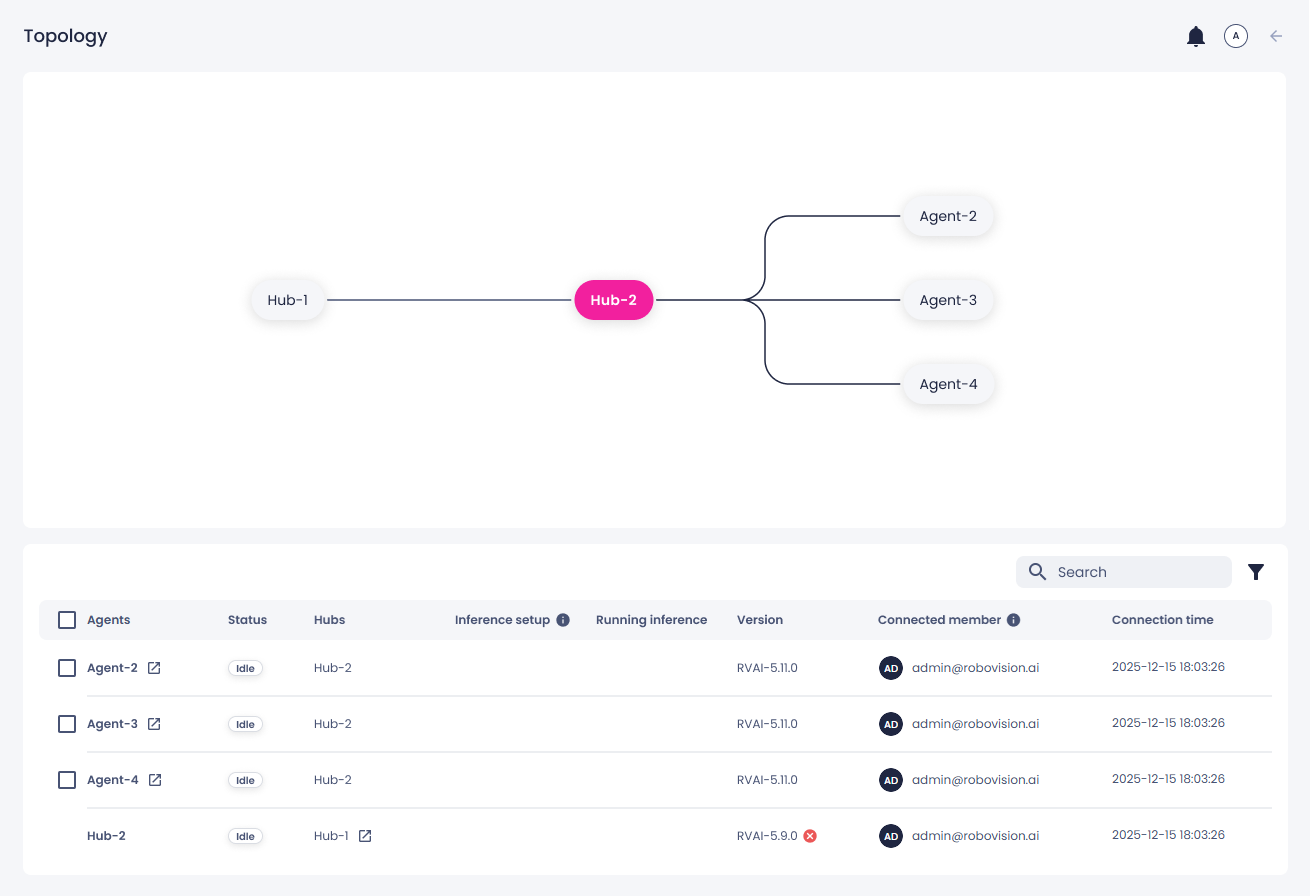
You can view all platforms connected to your platform (hub-agent topology) in the Topology module. Here, you can also:
- Audit connections – confirm which platforms are active.
- Troubleshoot – identify where a connection is failing.
- Understand structure – see how platforms link together.
- Track changes – check who connected a hub and an agent and when.
- Manage inference setups – view inference setups transferred to agents, start inference runs, and stop them.
The hub–agent topology provides a hierarchical communication model in which a central hub manages connectivity, status propagation, and visibility for all connected agents and downstream hubs. This architecture enables controlled communication flows, consistent status evaluation, and a clear parent–child relationship for distributed platforms.
Hubs and agents communicate over a persistent WebSocket connection. The connection stays open while both platforms are online. WebSocket communication is bidirectional. A hub and an agent can each send real-time messages, such as status updates, connection health, and operational events.
Agent types
Two types of agents can appear in the topology:
-
Headless agent – An on-premise inference device that connects to the hub via URL-based registration.
-
Platform agent – A full Robovision AI platform connected to a hub via a platform-to-platform connection.
You can connect a headless agent to the hub by following the setup steps in Connect headless agent to hub. To connect another Robovision AI platform, see Set up platform-to-platform connection.
Visibility in topology
A hub has full visibility into all resources that belong to its subtree. This includes:
- Its directly connected agents.
- Its child hubs.
- Any agents connected to those child hubs.
This allows a hub to present a complete overview of everything it manages. Agents and child hubs have a limited, upward-only view. They can see only their direct parent hub.
Some agents may appear under more than one hub. In these cases:
- Each hub maintains its own connection to the agent.
- The agent’s status is evaluated independently per hub.
For example, if an agent disconnects from hub B but stays connected to hub A, the two hubs will show different statuses for that same agent. This ensures each hub accurately reflects its own connection state.
Statuses
The statuses reflect inference activity, rather than connection states.
Agents may appear in one of the following states:
-
Idle
The agent is online and available. It is not currently running an inference task. This status includes situations where the agent is connected or still establishing a connection.
-
Disconnected
The agent is not available for inference. This may occur when the agent is offline, has failed to connect, or its state cannot be determined.
-
Inference running
There is an inference running on the agent deployment. The agent remains connected but is marked as busy until the task completes.
-
Inference failed
The agent attempted to run an inference, but the operation did not complete successfully. The agent remains connected, but the inference task ended with an error.
To explore the diagram
- Zoom in/out: Use your mouse wheel or trackpad gestures to zoom in for details or zoom out to see the bigger picture.
- Pan: Click and drag to move across the diagram and explore different areas.
- View details: Hover over any platform node to display detailed information about it.
To open the deployment
- In the topology diagram, hover over a connected platform, and then click the link icon (
 ).
). - In the list of connections, next to the platform name, click the link icon.
To filter the connections in the list
- Select the filters button (
 ), and then apply one of the filters.