Work with empty annotations
In this article, you will learn how to use empty annotations and distinguish them from no annotations.
Concept of "empty annotation"
Glossary
Empty annotations are used when a sample doesn't contain any of the classes present in the project. Assigning an empty annotation indicates that none of the existing classes apply to the sample.
Project types that support empty annotations:
- Multilabel classification
- Object detection
- Instance segmentation
- Semantic segmentation
- Multiview instance segmentation
Example
Imagine you are working on a project to identify and classify animals in images. You have three classes: dog, cat, and bird. If you come across an image that doesn't contain any of these animals (for example, an image of a car), you can assign an empty annotation to that sample, indicating that none of the existing classes apply to this image.
Concept of "no annotation"
A sample with no annotation is a sample that hasn't been annotated, or its annotation has been deleted by the user. It represents unprocessed or overlooked samples.
"No annotation" vs "empty annotation"
The choice between "no annotations" and an "empty annotation" depends on your task.
No annotation | Empty annotation | |
|---|---|---|
| Advantages |
|
|
| Disadvantages |
|
|
Considerations:
- If the task requires clear and immediate guidance, having "no annotations" may be preferable.
- If the task involves evolving annotations or future updates, providing an "empty annotation" framework can be beneficial.
In the user interface
-
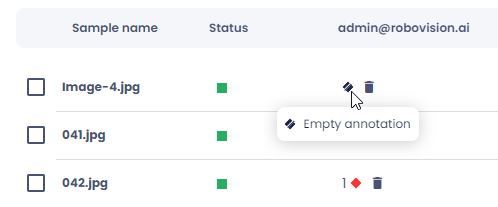
Empty annotations are visualized with a crossed-out black diamond.
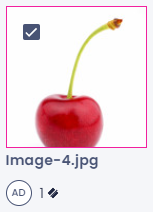
-
When written out, they are called "empty annotation".
Assign an empty annotation
-
In the single view:
- On the bottom toolbar, click Annotate as empty.
- Click Submit.
-
In the thumbnails or list view:
-
Select one or several samples.
Note
If you select samples and then go to another page, these samples will no longer be selected.
-
On the bottom toolbar, click Annotate as empty.
-
Filtering and datasets
- Using filters: In the Filter panel, you can filter samples with annotations, empty annotations, and no annotations. Annotations also include empty annotations.
- Class distribution chart: In the class distribution chart, you can view and filter samples with empty annotations and no annotations.
- Creating datasets: When creating datasets, samples with empty annotations are added to the datasets.
Key takeaways
- Use empty annotations for samples that don't contain any of the classes in your project.
- No annotations represent unprocessed or overlooked samples in your project.
- Use filters and charts to view and analyze samples with empty annotations and no annotations in your dataset.
- Add samples with empty annotations to your datasets acknowledging that these samples don't contain any of the project classes.