Branding
You can customize the Robovision AI platform to match your brand's look and feel.
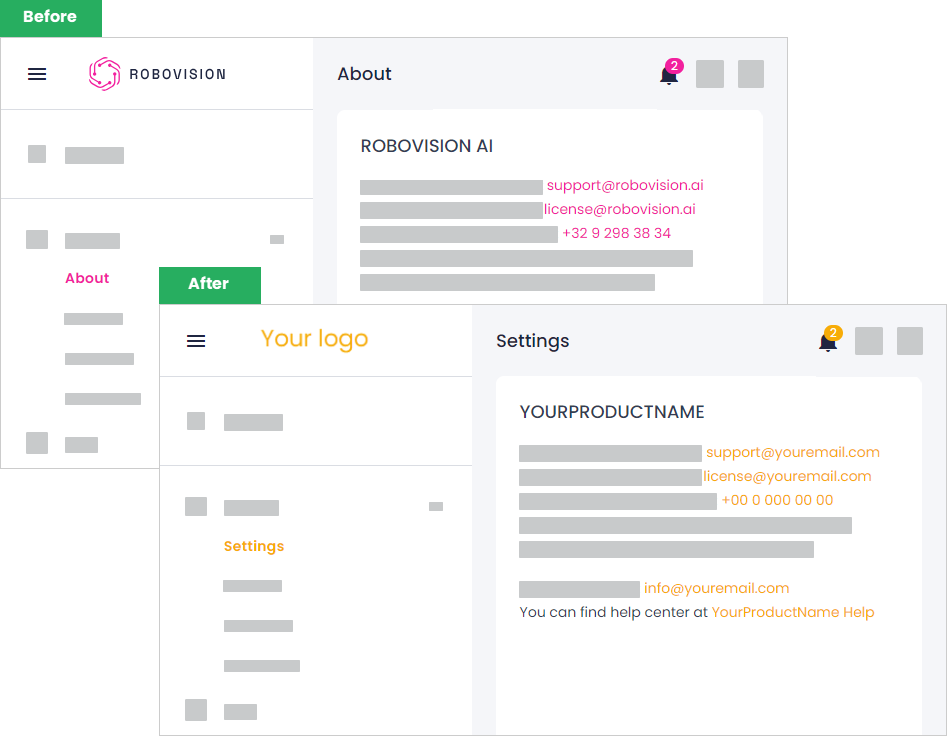
Here's what you can customize:
- Logo and favicon.
- Primary color of the platform (pink) in the light theme. In the dark theme, the default primary color (blue) is always used.
- Contact information on the About page.
- UI text in the core application (for example, the product name).
- Documentation.
- Legal notices (cookies, terms and conditions, and the privacy policy).
For the detailed procedure, see Change brand assets.
Once you're done branding the Robovision AI platform, you can easily transfer all your customizations to another instance of Robovision AI. For more information, see Export brand assets and Import brand assets.
If needed, you can also go back to the default branding.