Edit cameras
You may edit the setup of existing cameras that have the Idle status.
Note
Cameras that are in use—with the In use status in the Status column—cannot be edited.
To edit a camera setup
- On the menu, go to System > Camera management.
- Go to the Cameras tab.
- Hover over the necessary camera.
- Click the ellipsis button.
-
Select Edit.
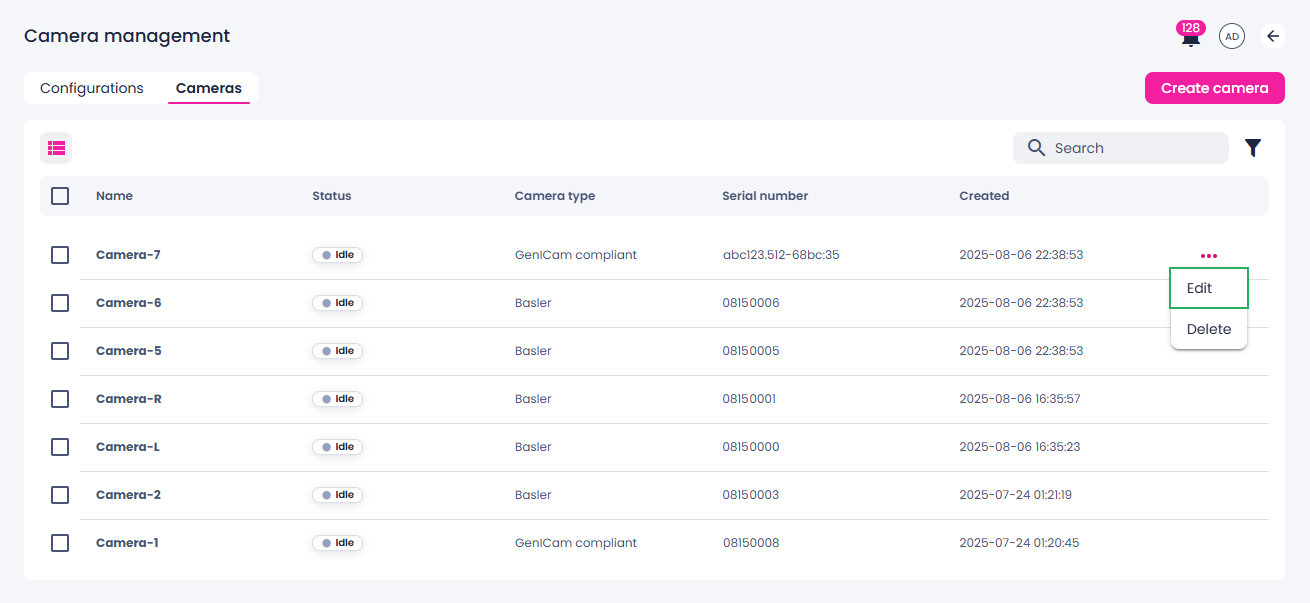
Alternatively, you can select the checkbox next to the camera that you want to edit, and then click Edit on the toolbar.
-
In the Edit camera sidebar, change the needed camera properties:
- Name
-
Thumbnail
You can update the thumbnail by uploading an image from your computer. For this, click the ellipsis button above the thumbnail, and then select Upload thumbnail.
-
Serial number
-
To save your changes, click Save.
The camera setup is updated.