Set up Basler cameras
You can set up Basler cameras in advance to include them later in configurations for data recording or inference. Alternatively, you can set up cameras when creating camera configurations.
To set up a Basler camera
- On the menu, go to System > Camera management.
- On the Cameras tab, in the upper-right corner, click Create camera.
- If necessary, edit the default camera name.
-
To upload a camera thumbnail from your computer:
- Next to the camera name, click the ellipsis button.
-
Select Upload thumbnail.
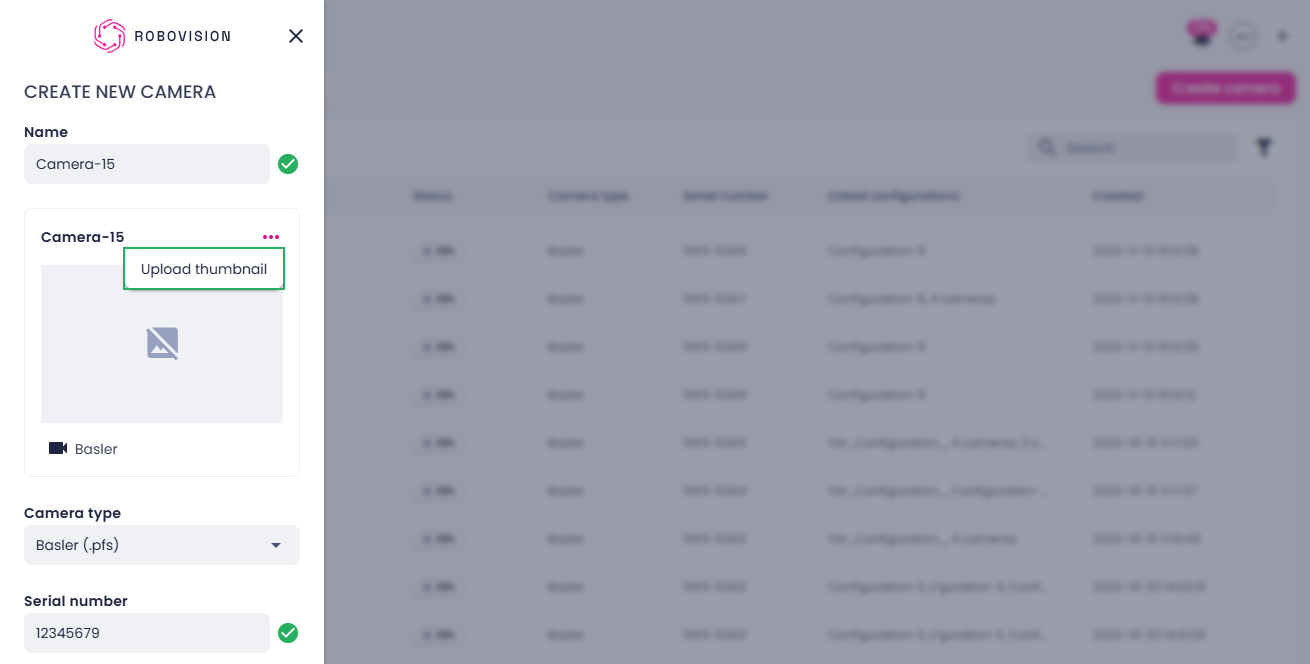
-
Select an image on your computer, and then click Open.
-
Ensure the Basler (.pfs) camera type is selected.
-
Enter the serial number.
The Basler camera serial number must be a unique 7–8 digit numeric identifier (digits only, no letters or spaces).
-
Click Create.
The added camera appears in the list of cameras and can be used in camera configurations. To use a camera in a camera configuration, the camera must have the Idle status displayed in the Status column.
On the Cameras tab, you can also: