Set up platform-to-platform connection
You can establish a connection between your instance of Robovision AI and another Robovision AI platform. This way, you can transfer samples and inference setups between the connected platforms.
You can connect your instance of Robovision AI to only one platform.
In a hub–agent topology, data exchange is organized through a central hub. Multiple agents connect to a single hub, and data is exchanged from the hub to the agents.
Preconditions
- Your platform has a valid license.
-
The target platform:
- Supports platform-to-platform connections.
- Has the same version as your platform, or its version is no more than two minor versions ahead of your platform's version.
-
The member whose credentials you use to set up the connection:
- Exists on the target platform and has the Administrator or Data scientist role there.
- Has accepted the terms and conditions on the target platform.
To connect two instances of Robovision AI
- On the menu, go to System > Settings.
-
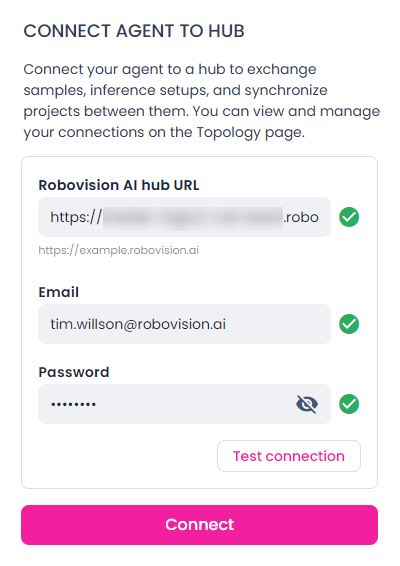
In the Platform-to-platform connection section, enter the URL of the Robovision AI platform with which you want to establish a connection.
Use the following URL format: https://example.robovision.ai/
-
Enter the email and password of a member from the target platform. This member needs to match the criteria listed in the preconditions for this procedure.
-
To check the connection, click Test connection.
If the test is successful, you can save the connection. If needed, you can test the existing connection at any point of time.
-
Click Connect.
The platforms are now connected. You can:
-
To remove the connection between the platforms:
- Click Disconnect.
- In the confirmation dialog, click Confirm.
Note
You won't be notified if the platforms get disconnected. To check the connection manually, see Test connection.