System members
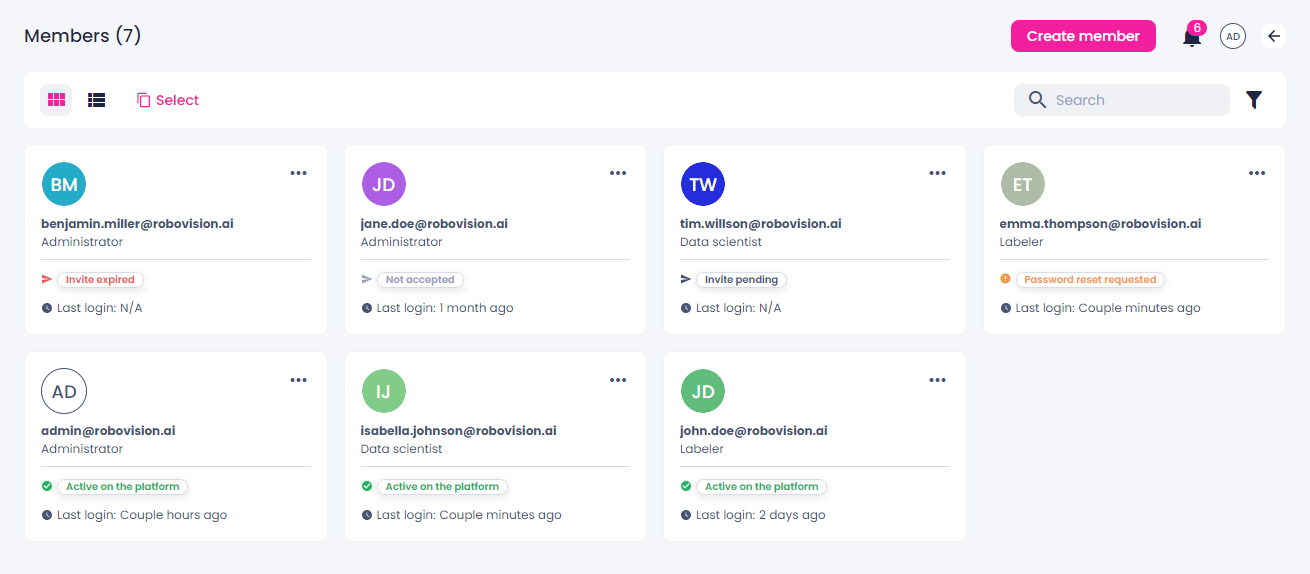
The list of members in Robovision AI is available on the Members page.
To view the member list
- On the menu, go to System > Members.
- To change the way the members are presented, switch between the thumbnails and list views.
The information about each member includes:
- Email address
-
Depending on the assigned role, each member has a set of permissions. These permissions define what the member can do on the platform.
-
Member status:
- Active on the platform – the member has completed onboarding and can use Robovision AI.
- Invite pending – the account is created, and the new user needs to use the invitation link to access the platform and start onboarding.
- Invite expired – the new user didn't use their invitation link within 24 hours, and the link has expired.
- Password reset requested – the member has requested password recovery.
- Not accepted – the member was created via API; they will need to accept the terms and conditions next time they log in. After that, their status will change to Active on the platform.
-
Last login date
You can manage members as follows: